Consoles & computers
PICO-8 Palette
PICO-8 is a fantasy console: a virtual 8-bit machine with a 128 × 128 screen and a fixed palette of 16 colors. Made by Lexaloffle Games and released in 2015, it turned that palette into one of the most recognizable in indie pixel art, used far beyond PICO-8 itself. Here are all 16 colors with their official names, hex and RGB values, and a free way to dither any image to them.
- Colors
- 16
- Year
- 2015
- Hardware
- Lexaloffle PICO-8, 128 × 128
- Match
- By color
The 16 PICO-8 colors
PICO-8 is software, so these are its exact colors, listed in its own order, colors 0 to 15; the names are the ones in the PICO-8 manual.
Download:HEX file of PICO-8GPL file of PICO-8
| Swatch | Name | Hex | RGB |
|---|---|---|---|
| Black | #000000 | 0, 0, 0 | |
| Dark blue | #1D2B53 | 29, 43, 83 | |
| Dark purple | #7E2553 | 126, 37, 83 | |
| Dark green | #008751 | 0, 135, 81 | |
| Brown | #AB5236 | 171, 82, 54 | |
| Dark gray | #5F574F | 95, 87, 79 | |
| Light gray | #C2C3C7 | 194, 195, 199 | |
| White | #FFF1E8 | 255, 241, 232 | |
| Red | #FF004D | 255, 0, 77 | |
| Orange | #FFA300 | 255, 163, 0 | |
| Yellow | #FFEC27 | 255, 236, 39 | |
| Green | #00E436 | 0, 228, 54 | |
| Blue | #29ADFF | 41, 173, 255 | |
| Indigo | #83769C | 131, 118, 156 | |
| Pink | #FF77A8 | 255, 119, 168 | |
| Peach | #FFCCAA | 255, 204, 170 |
A palette made for small games
Joseph White, known as zep, designed PICO-8 around deliberate limits: a 128 × 128 display, 16 colors, four-channel sound, and cartridges of 32 KB saved as PNG images with the code, graphics and music inside. The limits are the point: small games that get finished, shared on the PICO-8 forum. Celeste began there, as Celeste Classic, made in four days for a game jam.
zep designed the palette for PICO-8 itself, trying many variations before settling on these 16. It holds cool and warm ramps, strong primaries for characters and pickups, and skin tones in pink and peach, so one palette can draw a forest, a dungeon or a face. That range is why artists use it for illustrations and in other engines too.
How PICO-8 uses its colors
Each color has a number from 0 to 15, shown in the table. Programs remap them with pal() to fade, flash or recolor sprites, and choose which are transparent with palt(). The screen always shows 16 colors at once.
PICO-8 also has 16 hidden colors, numbered 128 to 143, that a cart can put on screen by remapping the display palette. They aren’t in the manual, though zep allows their use. PixelSynth’s preset sticks to the standard 16; add hidden ones through a Custom palette if you need them.
How to make PICO-8-style images
- Open the editor with PICO-8 selected. It matches by color, picking the nearest of the 16 for every pixel.
- For the PICO-8 look in one click, apply the pixel art preset: it shrinks the image to about 128 × 96 pixels’ worth of detail and uses PICO-8 with a 2×2 Bayer pattern.
- For a real cart screen, crop the image square first and set Output size to 128 pixels.
- Save at ×4 or ×8 to share. At ×1 and 128 × 128, the PNG is ready for PICO-8’s import command, which loads it onto the sprite sheet.
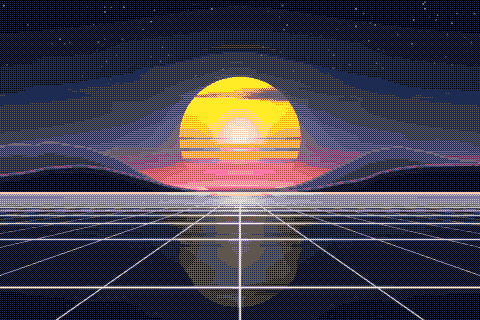
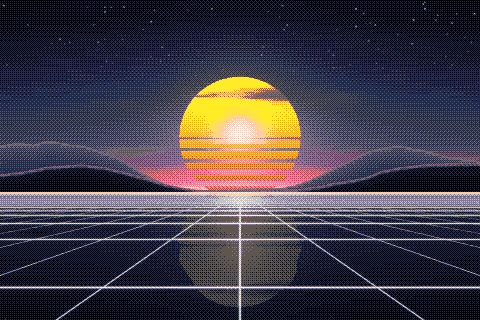
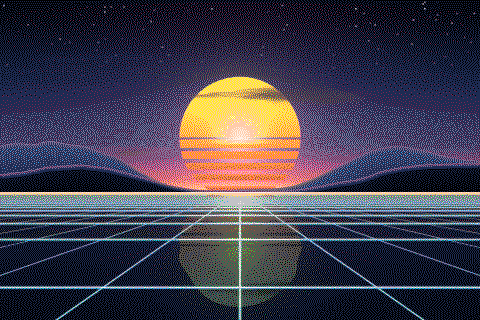
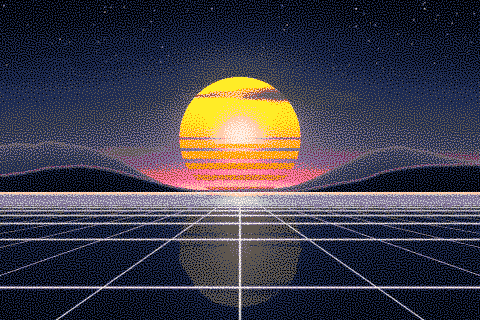
The PICO-8 palette with different dithering algorithms
The same sunset at 480 × 320 pixels, shown at actual size.
Try the PICO-8 palette on your image
Open the editor with PICO-8 already selected, drop in a photo or an animated GIF, pick a dithering algorithm and export a PNG or an animated GIF. Free, no account, no watermark, and your image never leaves your device.
Open PICO-8 in the editorPICO-8 palette FAQ
Does PixelSynth include PICO-8’s secret palette?
No, the preset has the 16 standard colors. To use the hidden ones, build a Custom palette and add their hex codes.
Why does my PICO-8 image look noisy?
At full resolution, 16 colors dither into fine noise. Shrink the image first, with Output size or the pixel art preset, so each pixel becomes a visible block, and prefer an ordered pattern like Bayer 2×2.