 SourceDithered
Line Screen
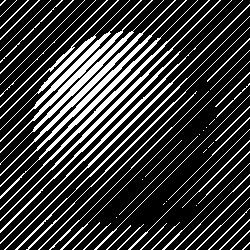
Parallel lines whose thickness follows the tone, like an engraving or a banknote. Set the line spacing and angle, let the light lift the lines like an oscilloscope, or make them wave.
- Author
- Unknown
- Year
- —
- Complexity
- low
- Processing cost
- 2 / 5
How it works
A grid of dots or lines, turned to an angle like a print screen, grows with the tone. Screen size, angle and dot shape are adjustable.
| 8 | 8 | 8 | 8 | 8 | 8 | 8 | 8 |
| 24 | 24 | 24 | 24 | 24 | 24 | 24 | 24 |
| 40 | 40 | 40 | 40 | 40 | 40 | 40 | 40 |
| 56 | 56 | 56 | 56 | 56 | 56 | 56 | 56 |
| 48 | 48 | 48 | 48 | 48 | 48 | 48 | 48 |
| 32 | 32 | 32 | 32 | 32 | 32 | 32 | 32 |
| 16 | 16 | 16 | 16 | 16 | 16 | 16 | 16 |
| 0 | 0 | 0 | 0 | 0 | 0 | 0 | 0 |
- The image is crossed by parallel lines 8 pixels apart; each line thickens from its middle as the image gets darker, one row of pixels at a time.
- A pixel turns white when its brightness exceeds the threshold at its position; the thresholds rank pixels by their distance to the line center. Ranking pixels as they actually fall on the grid keeps every gray level exact.
- In the editor, set the line spacing (4–64 px) and the angle; displacement lifts the lines where the image is bright, and wave ripples them along their length. With dots lighter than the background, the lines mark the light areas instead.