 SourceDithered
Halftone
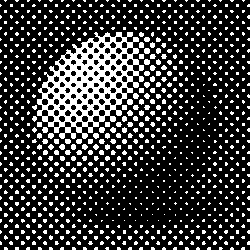
Round, square or diamond dots on an angled grid, growing with the shadows like newspaper and offset print. Set the screen size and angle.
- Author
- Frederic Ives
- Year
- 1880s
- Complexity
- medium
- Processing cost
- 2 / 5
How it works
A grid of dots or lines, turned to an angle like a print screen, grows with the tone. Screen size, angle and dot shape are adjustable.
| 3 | 11 | 23 | 39 | 37 | 21 | 9 | 1 |
| 7 | 15 | 31 | 47 | 45 | 29 | 13 | 5 |
| 19 | 27 | 51 | 59 | 57 | 49 | 25 | 17 |
| 35 | 43 | 55 | 63 | 61 | 53 | 41 | 33 |
| 32 | 40 | 52 | 60 | 62 | 54 | 42 | 34 |
| 16 | 24 | 48 | 56 | 58 | 50 | 26 | 18 |
| 4 | 12 | 28 | 44 | 46 | 30 | 14 | 6 |
| 0 | 8 | 20 | 36 | 38 | 22 | 10 | 2 |
- The image is covered by a grid of 8×8 pixel cells, each holding one dot that grows from its center as the image gets darker. The round dot becomes a checkerboard at 50% gray, then round holes.
- A pixel turns white when its brightness exceeds the threshold at its position; the thresholds rank pixels by their distance to the dot center. Ranking pixels as they actually fall on the grid keeps every gray level exact.
- In the editor, set the screen size (4–64 px) and the angle, and pick round, square or diamond dots. With dots lighter than the background, the dots mark the light areas instead.